This open source tool could process and edit audio file format into WAV, MP3, OggVorbis and AIFF or record audio file through soundcard. Such as to digitalized your analog music disc.
There so much effect available to edit audio. Such as, you can delete noise, add echo, change the rythme and tempo seperately, or playback song from last to beginning.
Audacity could handle until 16 audio track. So you could mix many sound. Using integrated equalizer, you can change frequency, such as to louder backing vocal or add bass effect.
Website | Direct Download (1.2.6 version)
28 October 2007
Audacity


24 October 2007
Faster Shut Down Process
After click "Start | Turn Off Computer", shut down process is way too slow until yur monitor is totally off. By change value in the registry you can make shut down process faster.
It's very annoying that your computer is way too slow to shut down when you need to meet your friend in other place. The shut down process is also depend on computer specification, but what if you had high spec? This little tips is gonna make your shut down process faster
Open registry editor (klik on "Start | Run | type regedit") then enter to key: "HKEY_LOCAL_MACHINE | System | ControlSet001 | Control" Now watch on entry "WaitToKillServiceTimeOut" on the right window. Default value of that entry is "20000". For this tips, you have to decrase that key value into "100". Double click on that entry and then type "100" at "Value Data". Click "OK" and close registry editor. After restart you computer, you will feel the effect on the next shut down.
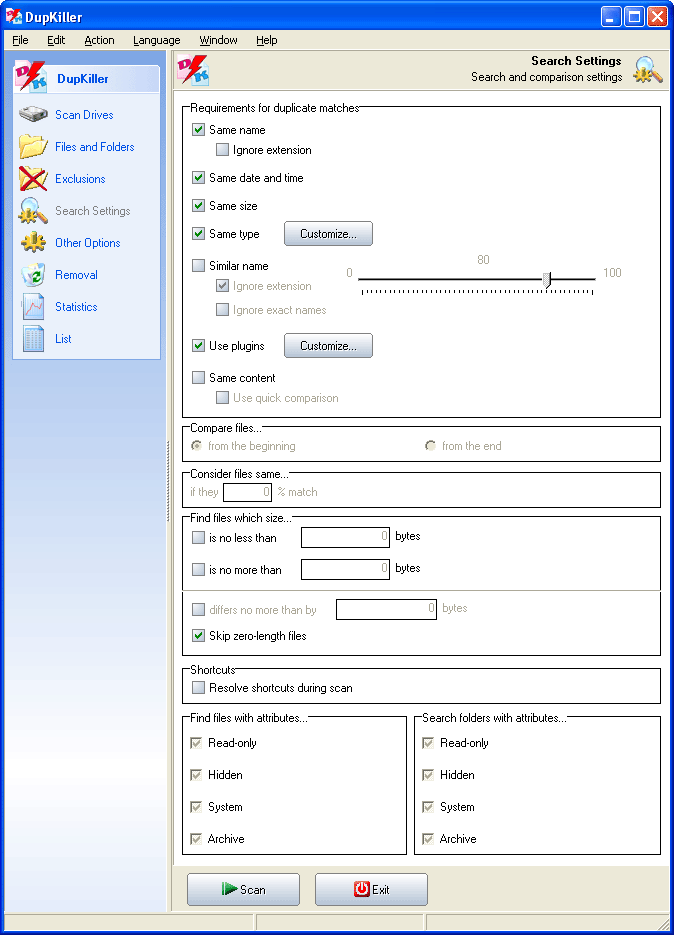
Dupkiller
Your harddisc getting full? Maybe many file duplicate located in many folder in your harddisc. Dupkiller will find that duplicate by criteria like file size, file type, file name or when file made. For high precission search search, there is byte-tobyte compare methode. To activate it, choose 'Same content' option.
Website | Direct Download (0.82 version)
Best Privacy Pack
To secure your private data, Best Privacy Pack is the worth freeware to choose. This software had three tools to secure your private data, there are Privacy Patrol, Password Container and Folder Hider. But there is a unique thing from this software. Three kind of tools above are not made by same company.
In Privacy Patrol you can clean your computer using history (history, cookies, recent files, Windows Media Player Playlist etc.). You also can block dangerous pop up and IP Address. Password Container is made to save all of your password, include your bank account. Folder Hider will hide and lock your private folder. So no one can open or view it even using "View Hidden Files" that build in Windows.
Website | Direct Download

22 October 2007
CD Burner XP
If your burner drive not bundled with burner tool, CD Burner XP Pro is the best alternative than expensive commercial software like Nero. This software had a lot facilities. Not only to burn CD or DVD this tool is also can burn boot disk, cd audio and ISO file. Using CD Ripper you can copy unprotected CD audio to your harddisk.
You can add tag on audio file using tag editor, and youcan convert WAV to MP3 or MP3 to WAV using 'mini' tool audio editor.
Website | Direct Download

Make "Copy to Folder" and "Move to Folder" in Context Menu
You can copy or move your file throgh context menu. You can choose one file or folder then click "Copy" or "Cut", and then choose folder for that file. This way is the most wat that used PC users beside shortcut. Now i give you little trik using "Copy" and "Cut" command.
First, open notepad. Then copy registry list below correctly.
Windows Registry Editor Version 5.00Then save as "CopyMove.reg". After this registry file became, double click on that file then click "OK" or "Yes" if new question window come. Now restart your computer and open Windows Explorer after you enter Windows System. Choose one file or folder and look at option in context menu. If you follow step by step above correctly, in context menu you will find two new option there are "Copy to Folder" and "Move to Folder". Using that two option you can copy or move file faster.
[HKEY_CLASSES_ROOT\AllFilesystemObjects\shellex\ContextMenuHandlers]
[HKEY_CLASSES_ROOT\AllFilesystemObjects\shellex\ContextMenuHandlers\Copy To]
@="{C2FBB630-2971-11D1-A18C-00C04FD75D13}"
[HKEY_CLASSES_ROOT\AllFilesystemObjects\shellex\ContextMenuHandlers\Move To]
@="{C2FBB631-2971-11D1-A18C-00C04FD75D13}"
PC Inspector File Recovery
Lost data or unwitting deleted data is not always lost forever. If not overwrited, maybe PC Inspector File Recovery could restore it. This software should not compared to commercial data recovery software. But if your lost data is not compressed or windows encrypt file, PC inspector could save it.
After strat the program, choose drive which file located. After searched, files that found will be saved in 'Deleted' folder. This Folder could found in left side screen. To find specific file, click on 'Find files' that located on left side screen then enter the file name.
Website

Xn View
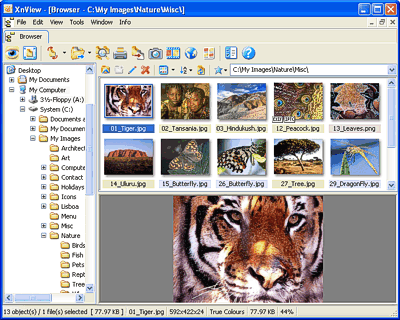
XnView have extra complete function if you work in many picture format. Viewer, editor, slideshow, import from scanner, camera and rename some files in one time is alradey there. Comfortable user interface is not forgotten. XnView open picture using tab system like most internet browser. this is minimize windows needs for every picture.
XnView could save picture in 60 formats and open more than 400 formats. Picture editing is also available even it's interface not as comfortable as complete picture editor like Adobe Photoshop. Xn View also could process some files in one time. You can access detail option trough "Tools | Batch Convert | Advance Operations".
XnView user interface start with picture browser that designed like Windows Explorer. Double click on picture then you access editing mode.
Website | Direct Download
Sygate Personal Firewall
Sygate Personal Firewall (SPF) is free for personal user. This firewall have more functions than other freeware firewall, and also the popular one like Zone Alarm. For you that mastering firewall, you will love this software, because you can set this firewall manually. For you that don't understanding about firewall, i suggest to learn it first
Website | Direct Download

AntiVir PersonalEdition Classic
Many anti virus today is built for protect you PC from malmware. Some anti virus offered on shareware and freeware. AntiVir PE Classic is the best choice. This anti virus could detect and remove more that 130.000 kinds of virus.
This anti virus work in real time in background so that virus and malmware can't enter your computer. This software is also hav protection from many kinds of dialer. Beside that, there is free update for your virus database for detect new virus.
Website | Direct Download

JAP Anonimity
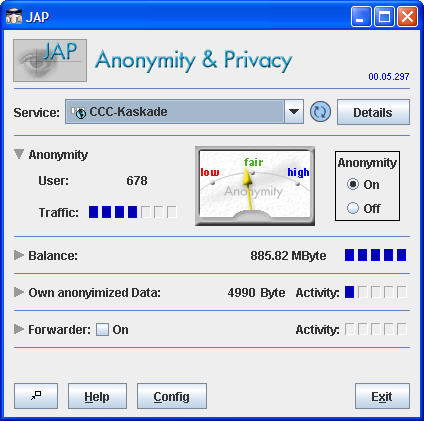
Spammer wants to see your data that he can send virus and spam? Just use JAP to protect you. This tool blur your IP Address and randomize all JAP user ID so that unable to track. Randomizing is able trough JAD facility that named Mix Proxy Cascade.
Website | Direct Download
Subscribe to:
Posts (Atom)

